How to Learn Python With AI: A Step-by-Step Guide for Beginners
 By Ayan Sarkar
10 min read
By Ayan Sarkar
10 min read
Python is one of the most popular programming languages for beginners because its syntax is relatively easy to understand and it can be used for many different applications, including web development, automation, data analysis, and artificial intelligence.
Today, beginners can also use artificial intelligence to make the learning process more interactive. AI can explain difficult concepts, provide coding exercises, identify errors, suggest practice activities, and answer questions based on a learner’s current level.
If you want to learn Python with AI, the key is to use AI as a learning assistant rather than simply asking it to write code for you. With regular practice and the right approach, AI can help make Python learning more personalized and engaging.
What Does It Mean to Learn Python With AI?
Learning Python with AI means using artificial intelligence as a support tool while studying Python programming.
Instead of depending only on textbooks, courses, or tutorials, learners can interact with an AI tutor to ask questions and receive explanations when they encounter difficulties.
For example, a beginner learning Python loops might ask:
“Explain Python for loops using a simple example.”
If the explanation is still confusing, the learner can ask:
“Explain it as if I have never written code before.”
This interactive process allows learners to ask follow-up questions until they understand the concept.
AI can assist with several parts of Python learning, including:
- Explaining programming concepts
- Creating coding exercises
- Providing hints
- Explaining error messages
- Reviewing code
- Generating examples
- Creating project ideas
- Helping learners practice problem-solving
However, learners should still write and test their own code. Understanding why a program works is more valuable than simply obtaining a working answer.
Can Beginners Learn Python With AI?
Yes, beginners can use AI to learn Python from the fundamentals.
AI can explain programming terminology in simpler language, provide examples, and create practice exercises based on the learner’s level. This can be particularly useful when a beginner encounters a concept that is difficult to understand from a standard tutorial.
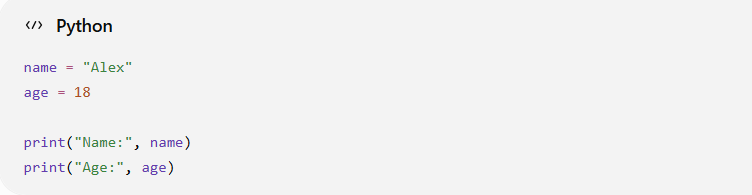
Rather than simply copying this example, ask an AI tutor to explain what each line does.
You could ask:
“Explain this Python program line by line and tell me why each variable is used.”
Python’s official documentation also provides a tutorial and reference material for learners who want to understand the language more deeply.
Step 2: Use AI to Simplify Difficult Concepts
One of the advantages of AI-assisted learning is that you can request different explanations of the same concept.
For example, if you are learning Python functions, you could ask:
“What is a Python function? Explain it using a real-life example.”
You can then follow up with:
“Show me a simple Python example.”
If the explanation remains difficult, ask:
“Explain the same concept in simpler language.”
This makes learning more conversational. Instead of moving to another tutorial whenever you are confused, you can continue asking questions about the same topic.
Step 3: Write Your Own Python Code
After learning a concept, practice it by writing a small program yourself.
For example, after learning conditional statements, try creating a program that checks whether a number is positive or negative.
Start with the problem:
“Write a Python program that checks whether a number is positive, negative, or zero.”
Before asking AI for the solution, try to write the program yourself.
If you get stuck, ask AI for a hint:
“Give me a hint for solving this problem without giving me the complete code.”
This approach allows AI to support your learning without taking away the problem-solving process.
Step 4: Use AI to Understand Python Errors
Making errors is a normal part of programming. Learning how to understand and fix those errors is an important Python skill.
For example:
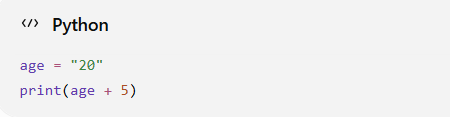
A beginner may not immediately understand why this produces an error.
Instead of simply asking AI to fix it, ask:
“Why does this Python code produce an error? Explain the reason and give me a hint.”
The explanation can help you understand the difference between strings and integers and why Python does not automatically perform the expected operation in this situation.
Over time, this type of practice can make debugging easier.
Step 5: Ask AI to Generate Practice Questions
Once you understand a Python concept, practice it with multiple problems.
For example, after learning lists, you could ask:
“Give me five Python exercises about lists for beginners. Start with easy problems and gradually increase the difficulty.”
After completing them, ask for another set.
You can also ask AI to create exercises around specific situations, such as:
- Student marks
- Shopping lists
- Expense tracking
- Simple games
- Temperature conversion
- Employee information
Context-based exercises can make programming concepts easier to connect with real-world situations.
Step 6: Learn by Building Small Projects
Once you understand the fundamentals, start building small Python projects.
Good beginner projects include:
- Calculator
- Number guessing game
- Quiz application
- To-do list
- Simple expense tracker
- Temperature converter
- Password generator
- Student grade calculator
Projects help you combine multiple concepts.
For example, a simple quiz application could involve:
- Variables
- Lists
- Loops
- Conditional statements
- Functions
- User input
Instead of asking AI to build the entire project, divide it into smaller tasks.
For example:
- Create the questions.
- Store the questions.
- Ask the user for answers.
- Compare the answers.
- Calculate the score.
- Display the result.
You can then use AI to explain each stage when you encounter a problem.
Step 7: Use AI for Code Review
After writing a Python program, AI can help you review your code.
Instead of asking:
“Rewrite my entire code.”
Try:
“Review my Python code and identify errors or areas that could be improved. Explain each issue so I can fix it myself.”
This can help you understand:
- Code structure
- Variable naming
- Repeated code
- Functions
- Readability
- Potential errors
- Programming practices
The objective is to understand the feedback rather than automatically accepting every suggestion.
Step 8: Create a Personalized Python Learning Path
After learning the fundamentals, your next Python topics should depend on what you want to do with Python.
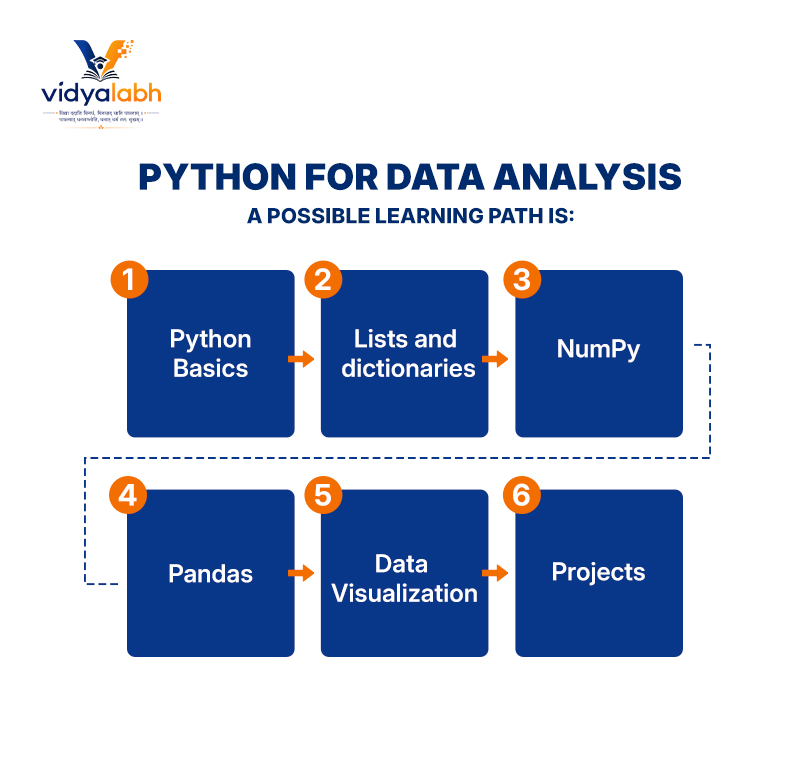
Python for Data Analysis
A possible learning path is:
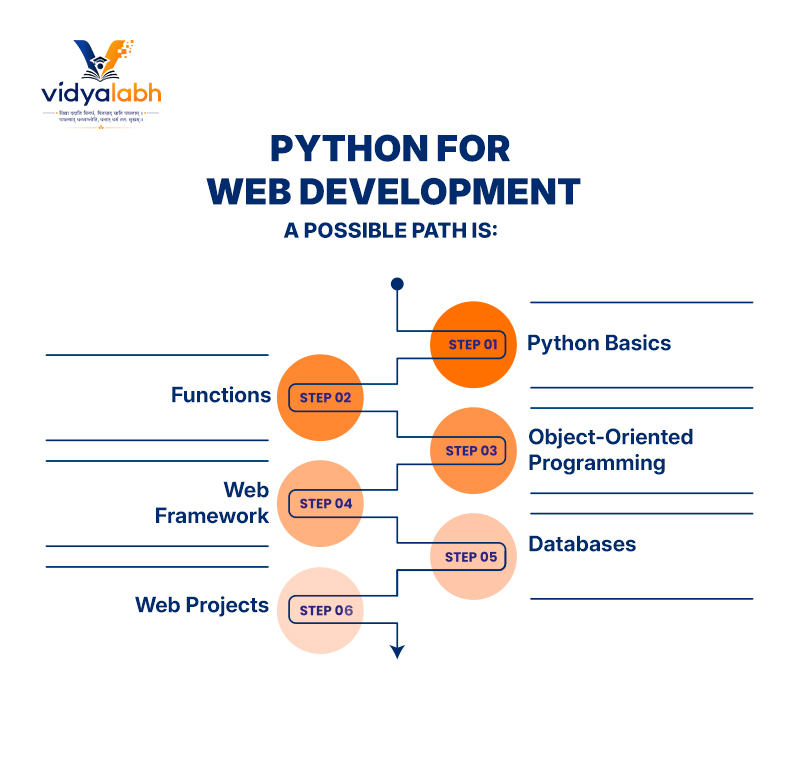
Python for Web Development
A possible path is:
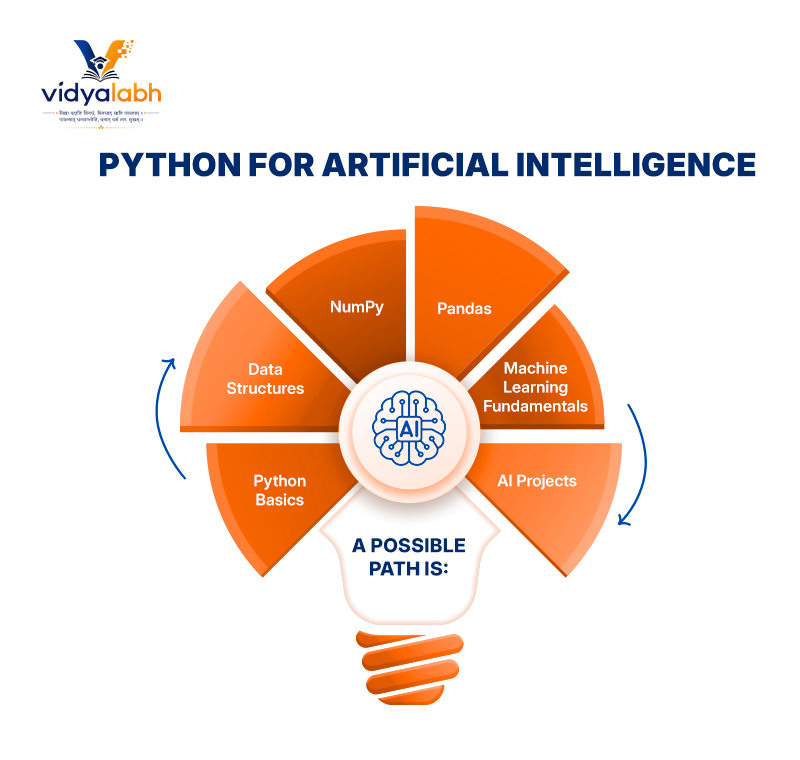
Python for Artificial Intelligence
A possible path is:
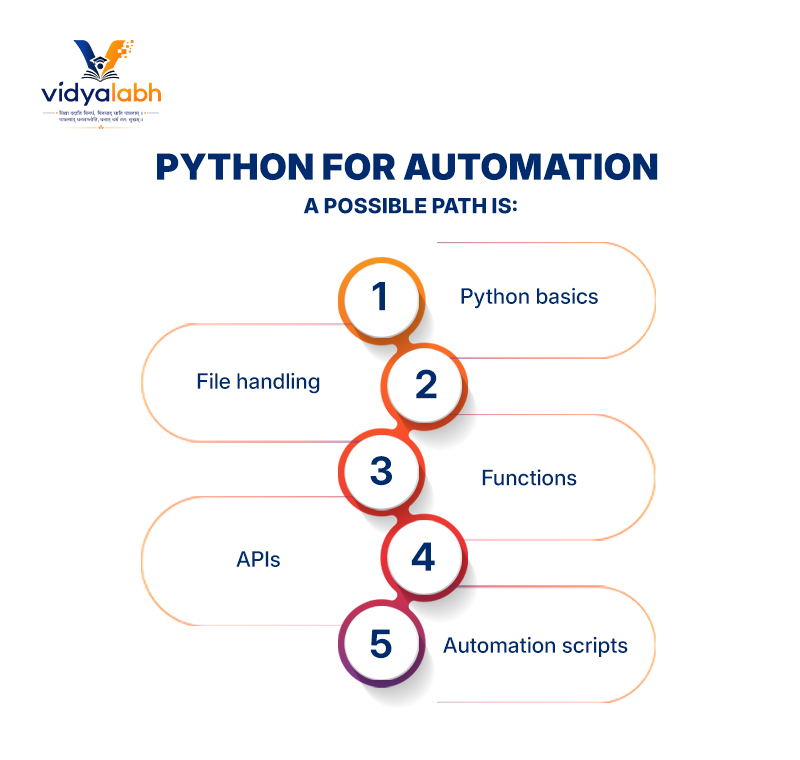
Python for Automation
A possible path is:
An AI tutor can help explain the next concept, generate exercises, and adjust the difficulty as your knowledge improves.
How Vidyalabh Can Help You Learn With AI
AI-assisted learning becomes more useful when learners can ask questions naturally instead of searching for every individual answer. Vidyalabh is an AI-powered learning platform that can be used as an interactive learning resource for students exploring different subjects, including programming concepts.
For someone learning Python, an AI tutor can be useful for questions such as:
- “What is a Python variable?”
- “Can you explain Python loops with an example?”
- “Why is my code showing this error?”
- “Give me a beginner exercise about functions.”
- “Give me a hint without revealing the answer.”
- “Explain this code in simpler language.”
This type of interaction can complement coding practice by giving learners a place to explore questions as they arise.
The most important part is still active learning. Students should write code, experiment with different solutions, test their programs, and use AI explanations to strengthen their understanding.
Best Practices for Learning Python With AI
Try the Problem Yourself First
Before asking AI for a complete solution, spend some time trying to solve the problem independently.
Ask for Hints
If you are stuck, ask for a clue instead of the complete answer. This helps maintain the problem-solving aspect of learning.
Ask AI to Explain the Reasoning
Don’t only ask what the correct code is. Ask why the code works.
Practice Without AI
Occasionally solve problems without AI assistance. This helps you determine whether you genuinely understand the concept.
Test AI-Generated Code
AI can sometimes produce incorrect or inefficient code. Always run the code, examine the output, and understand what it does.
Use Reliable Documentation
AI can support learning, but official documentation remains an important technical reference. Python’s documentation provides detailed information about the language and its standard library.
Build Projects
Projects provide opportunities to apply multiple concepts at the same time and expose gaps in your understanding.
A Simple 30-Day Plan to Learn Python With AI
A beginner can divide their first month into four stages.
Week 1: Python Basics
Focus on:
- Variables
- Data types
- Strings
- Operators
- Input and output
- Conditional statements
Use AI to explain concepts and generate short exercises.
Week 2: Programming Fundamentals
Learn:
- Lists
- Dictionaries
- Loops
- Functions
- Basic error handling
Practice writing small programs without copying complete AI-generated solutions.
Week 3: Problem Solving
Spend more time solving coding exercises.
Use AI for:
- Hints
- Error explanations
- Alternative explanations
- Code reviews
- Additional practice questions
Week 4: Build a Small Project
Choose a simple project such as a calculator, quiz, or expense tracker.
Break the project into smaller tasks and complete them one at a time.
At the end of the month, review the concepts you found most difficult and practice them again.
Common Mistakes to Avoid
Copying AI Code Without Understanding It
A program may work correctly, but that does not mean you have learned how it works.
Asking AI to Solve Every Exercise
If AI completes every problem, you have fewer opportunities to develop your own programming logic.
Skipping the Fundamentals
Trying to build advanced AI or web applications before understanding Python basics can make programming more difficult.
Ignoring Errors
Errors are valuable learning opportunities. Understanding why something went wrong is an important part of becoming a programmer.
Depending Completely on AI
AI should support your learning process rather than replace it. Continue practicing independently and use reliable technical resources when necessary.
Frequently Asked Questions
What is the best way to learn Python with AI?
Start with Python fundamentals, practice each concept through small programs, use AI for explanations and hints, learn from errors, and gradually move toward projects.
Can a complete beginner learn Python using AI?
Yes. AI can explain basic programming concepts, provide examples, create exercises, and answer follow-up questions. Beginners should combine this support with regular hands-on coding practice.
Can AI help me understand Python errors?
Yes. You can provide the relevant code and error message and ask AI to explain the cause. It can help you understand what went wrong and suggest ways to investigate the problem.
Should I let AI write my Python programs?
AI can generate example code, but beginners should avoid relying on it for every programming task. Writing your own code and solving problems independently are important for developing programming skills.
How can I use AI without becoming dependent on it?
Try solving problems independently first. Use AI for hints, explanations, debugging, and feedback rather than immediately requesting complete solutions. Regularly practice without AI as well.
How long does it take to learn Python?
There is no fixed timeline. The time depends on your previous programming experience, study schedule, learning goals, and amount of practice. Beginners can start learning basic Python concepts relatively quickly, but developing strong programming skills requires continued practice.
Conclusion
Learning Python with AI combines programming practice with interactive guidance. Beginners can use AI to understand concepts, ask questions, generate exercises, troubleshoot errors, review code, and develop project ideas.
The most effective approach is to keep the learner actively involved: write the code, test it, make mistakes, understand the errors, and try again.
AI can make this process more accessible by providing explanations and guidance whenever questions arise. Platforms such as Vidyalabh can complement this approach by providing an interactive AI-powered learning environment for students.
Whether your goal is to explore programming, build automation scripts, analyze data, develop applications, or eventually work with artificial intelligence, starting with Python fundamentals and practicing consistently provides a strong foundation.