How to Learn Coding With AI: A Complete Beginner’s Guide
 By Ayan Sarkar
15 min read
By Ayan Sarkar
15 min read
Learning to code no longer means spending months memorizing syntax before you can build something useful. With artificial intelligence (AI), beginners can learn programming interactively, get instant explanations, debug errors, generate practice exercises, and build projects with an AI coding assistant by their side.
If you want to learn coding with AI, the most effective approach is not to let AI write everything for you. Instead, use AI as a personal coding tutor that helps you understand concepts, practice problem-solving, identify mistakes, and gradually become more independent.
In this guide, you’ll learn how to use AI to learn coding from scratch, which programming languages to start with, how Large Language Models (LLMs) support programming education, effective AI prompts for coding, common mistakes to avoid, and a practical roadmap for becoming a confident programmer.
What Does It Mean to Learn Coding With AI?
Learning coding with AI means using artificial intelligence tools as a learning assistant to understand programming concepts, write and review code, debug errors, practice coding problems, and build projects.
Instead of simply searching for an answer when you get stuck, you can ask an AI tool to explain the concept, provide hints, review your approach, or help you understand why your code is not working.
For example, a beginner learning Python might ask:
“Explain Python loops to me like I’m a complete beginner. Give me one simple example and then a practice problem without showing me the answer.”
This creates an interactive learning experience rather than passive content consumption.
Why Is AI Useful for Learning Coding?
AI can support several parts of the programming learning process:
- Concept explanations: Simplifies difficult programming concepts.
- Code generation: Creates examples based on your requirements.
- Debugging: Helps identify potential errors and explains why they occur.
- Practice: Generates coding exercises based on your skill level.
- Code review: Suggests improvements to your code.
- Project guidance: Helps break large projects into manageable tasks.
- Personalized learning: Adjusts explanations based on your questions and progress.
- Instant feedback: Provides immediate responses without waiting for a teacher or mentor.
The important distinction is that AI should support your learning process—not replace it.
Can You Learn Coding With AI as a Complete Beginner?
Yes. Beginners can learn coding with AI, even without previous programming experience. AI can explain programming fundamentals, provide examples, generate practice exercises, help debug code, and provide step-by-step guidance.
However, you still need to develop your own programming skills.
A good learning cycle is:
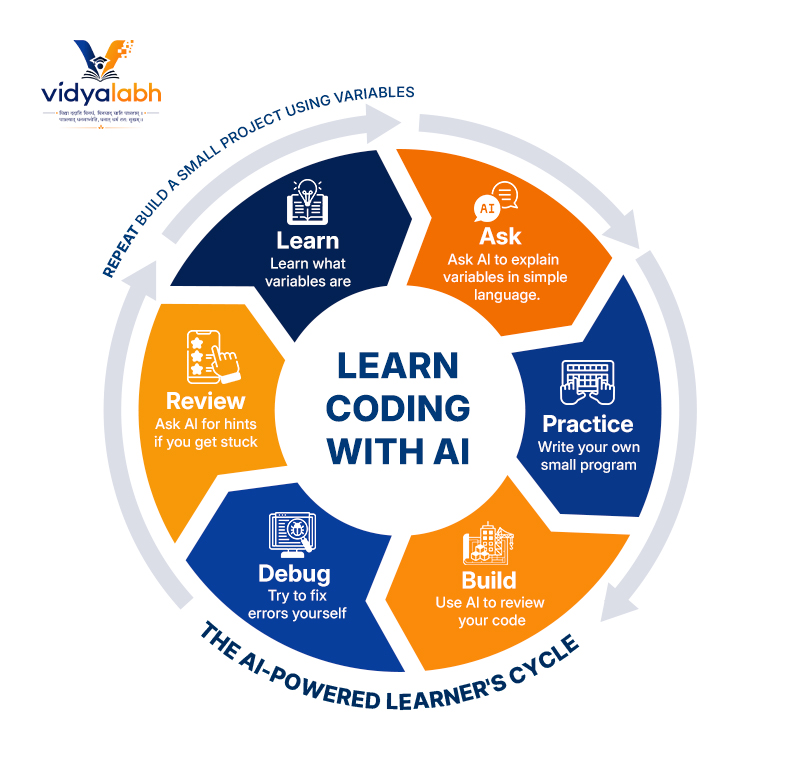
This approach helps you develop problem-solving skills and computational thinking, rather than simply learning how to copy AI-generated code.
How to Learn Coding With AI Step by Step
1. Choose One Programming Language
Don’t start by trying to learn Python, JavaScript, Java, C++, SQL, and other languages simultaneously.
Choose one language based on what you want to build.
| Goal | Recommended Language |
| Beginner programming | Python |
| Websites | HTML, CSS, JavaScript |
| Web applications | JavaScript |
| Data analysis | Python |
| AI and machine learning | Python |
| Android development | Kotlin |
| iOS development | Swift |
| Databases | SQL |
| Game development | C# |
For most complete beginners, Python is a strong starting point because its syntax is relatively readable and it is widely used in automation, data science, artificial intelligence, and software development.
2. Learn the Programming Fundamentals
Before asking AI to build complex applications, understand the fundamentals.
Start with:
- Variables
- Data types
- Operators
- Conditional statements
- Loops
- Functions
- Lists and arrays
- Dictionaries and objects
- Error handling
- Files
- Modules
- Basic algorithms
- Data structures
You don’t need to memorize every programming rule.
Instead, focus on understanding why the code works.
For example, instead of asking:
“Write a Python calculator.”
Ask:
“Teach me how to build a calculator in Python. Explain the logic first, then let me write the code myself.”
This turns AI from a code generator into an interactive tutor.
3. Use AI as Your Personal Coding Tutor
One of the biggest advantages of AI-assisted learning is personalization.
You can tell an AI system your experience level and learning objective.
Try a prompt like:
“Act as my Python tutor. I am a complete beginner. Teach me Python step by step. Don’t give me complete solutions immediately. Ask me questions and give me hints when I make mistakes.”
You can also define how you want explanations delivered.
For example:
“Explain this JavaScript function using a simple real-world analogy. Then give me three progressively harder exercises.”
This type of interaction can make learning more engaging and adaptive.
4. Learn How to Prompt AI for Coding
Knowing how to communicate with an AI coding assistant is an increasingly useful skill.
A vague prompt might be:
“Fix my code.”
A better prompt provides context:
“I’m learning Python and this is my code. Explain why it produces this error. Don’t rewrite the entire program. Identify the problem, explain the concept behind it, and give me a hint so I can fix it myself.”
A strong coding prompt usually includes:
Context + Goal + Code + Error + Constraints + Desired Output
Example
“I’m a beginner learning JavaScript. I am trying to create a function that checks whether a number is even or odd. Here is my code: [code]. Explain the error in simple terms and give me a hint rather than the complete solution.”
The more useful context you provide, the more useful the AI’s response is likely to be.
5. Use AI to Understand Errors and Debug Code
Debugging is one of the most important programming skills.
When your program fails, don’t immediately ask AI to rewrite everything.
First, understand the error.
Ask:
“Explain this error message in beginner-friendly language.”
Then ask:
“What part of my code is most likely causing this error?”
Then try to fix it yourself.
Finally, ask:
“Review my solution and explain whether I fixed the underlying problem.”
This creates a valuable debugging feedback loop.
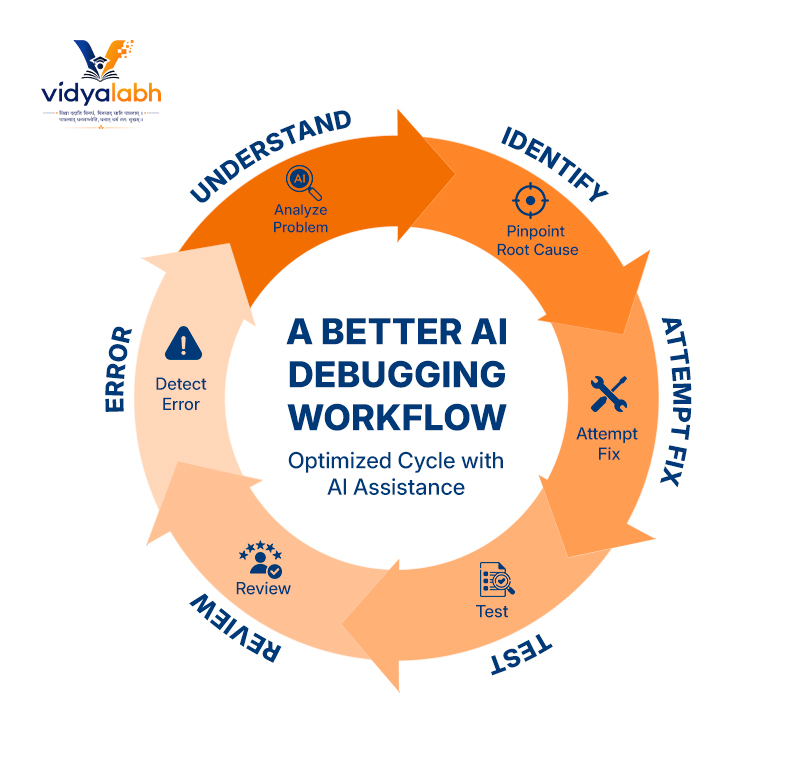
A Better AI Debugging Workflow
This process helps you learn how programmers actually solve problems.
6. Ask AI to Generate Coding Exercises
Practice is essential when you learn coding with AI.
Instead of repeatedly asking AI for solutions, ask it to create exercises.
For example:
“Give me five beginner Python exercises about loops. Don’t provide the solutions until I ask.”
Once you’ve completed them, ask:
“Review my answers. Tell me which solutions are correct and explain only the mistakes.”
You can also make the exercises progressively harder:
- Beginner
- Easy
- Intermediate
- Advanced
- Project-based
This allows AI to function as a personalized practice generator.
7. Build Real Projects
Tutorials can teach concepts, but projects teach you how to apply them.
Once you understand basic programming concepts, start building small applications.
Beginner Project Ideas
Python
- Calculator
- Number guessing game
- To-do list
- Expense tracker
- Password generator
- Quiz application
- File organizer
JavaScript
- Interactive calculator
- Digital clock
- Weather interface
- To-do application
- Quiz website
- Interactive form
HTML/CSS/JavaScript
- Personal portfolio
- Landing page
- Blog interface
- Product page
- Interactive dashboard
- The goal isn’t to build something huge.
The goal is to encounter real problems and learn how to solve them.
8. Use AI to Break Large Projects Into Smaller Tasks
A common beginner mistake is asking AI:
“Build me a complete e-commerce website.”
The result may contain thousands of lines of code that you don’t understand.
Instead, break the project into smaller components.
For example:
E-commerce project
- Create the homepage.
- Build the product listing.
- Create product cards.
- Add filtering.
- Add a shopping cart.
- Create the checkout interface.
- Connect the database.
- Add authentication.
- Test the application.
- Deploy the project.
Ask AI to explain each component before implementing it.
This approach makes complex software development easier to understand.
How Large Language Models Help You Learn Coding
Large Language Models (LLMs) are AI models trained on large amounts of text and code. They can generate, explain, transform, summarize, and reason about programming-related content.
Modern AI coding tools often use LLMs to assist with tasks such as:
- Code generation
- Code completion
- Debugging
- Refactoring
- Documentation
- Test generation
- Natural-language programming
- Technical explanations
For learners, one of the most valuable capabilities is the ability to ask questions in natural language.
Instead of searching for:
“Python list comprehension syntax”
you can ask:
“Explain Python list comprehensions using three simple examples. Then give me a problem to solve.”
This makes the learning process conversational.
What Is NLP and Why Does It Matter for AI Coding?
Natural Language Processing (NLP) enables computers to process and understand human language.
When you tell an AI coding assistant:
“Create a Python function that calculates the average of a list of numbers.”
NLP-related capabilities help the system interpret your natural-language instruction and translate the intent into programming code.
This creates a bridge between human language and programming languages.
However, AI-generated code can still contain incorrect assumptions, bugs, security problems, or outdated approaches. Understanding the underlying programming concepts remains essential.
AI Coding Tools vs. Traditional Coding Learning
AI doesn’t necessarily replace traditional programming education. It changes how learners interact with learning resources.
| Traditional Learning | AI-Assisted Learning |
| Fixed explanations | Interactive explanations |
| Generic exercises | Personalized exercises |
| Delayed feedback | Immediate feedback |
| Search for errors manually | Conversational debugging |
| Follow predefined tutorials | Adaptive learning |
| Memorize examples | Generate and modify examples |
| Ask a teacher or community | Ask an AI assistant anytime |
The strongest approach combines both.
Use documentation, courses, books, tutorials, communities, and real projects alongside AI.
How to Learn Coding With AI Without Becoming Dependent on It
AI can make programming easier—but excessive dependence can slow your development.
Avoid asking AI for the complete solution every time.
Instead, use a progressive assistance model.
Level 1: Try It Yourself
Spend some time solving the problem independently.
Level 2: Ask for a Hint
If you’re stuck, ask AI for a clue.
Level 3: Ask for an Explanation
Ask AI to explain the programming concept you are missing.
Level 4: Review an Example
Ask for a small example related to the concept.
Level 5: Compare Solutions
After solving the problem, ask AI to review your approach.
This keeps you actively involved in the learning process.
Common Mistakes When Learning Coding With AI
1. Copying AI-Generated Code
Code that works isn’t necessarily code you understand.
Always ask:
“Why does this work?”
2. Learning Too Many Languages
Switching between languages constantly can create unnecessary confusion.
Master the fundamentals of one language first.
3. Asking Vague Questions
Poor prompts often produce generic answers.
Instead of:
“Teach me coding.”
Try:
“I’m a beginner. Teach me Python functions using simple examples and give me three exercises. Don’t provide the answers initially.”
4. Skipping Documentation
AI is useful, but official documentation remains an important source of truth.
Develop the habit of checking documentation for syntax, APIs, libraries, and framework behavior.
5. Not Testing AI-Generated Code
Never assume AI-generated code is correct.
Run it, test it, inspect the output, and understand the logic.
6. Building Projects That Are Too Complex
Don’t start by building a full-scale social network or enterprise application.
Start small and increase complexity gradually.
A 30-Day Roadmap to Learn Coding With AI
You can use the following roadmap as a starting point.
| Period | Focus |
| Days 1–5 | Programming fundamentals |
| Days 6–10 | Variables, conditions, loops and functions |
| Days 11–15 | Data structures and error handling |
| Days 16–20 | Coding exercises and debugging |
| Days 21–25 | Build a small project |
| Days 26–28 | Improve and refactor the project |
| Days 29–30 | Build a second mini-project |
Daily Learning Routine
A simple 60–90 minute routine could look like:
15 min: Learn a concept
20 min: Ask AI questions
25 min: Solve exercises
20 min: Build something
10 min: Review what you learned
Consistency matters more than spending several hours learning occasionally.
Best AI Prompts for Learning Coding
Here are practical prompts you can reuse.
Learn a Concept
“Explain [programming concept] as if I am a complete beginner. Give me a simple example, a real-world analogy, and one practice exercise.”
Get a Hint
“I’m trying to solve this programming problem. Don’t give me the answer. Give me one hint that helps me identify the next step.”
Debug Code
“Review this code and explain why it isn’t working. Don’t rewrite the entire program. Help me understand the underlying issue.”
Practice
“Create five coding exercises about [topic], starting from beginner level and increasing in difficulty. Don’t provide the solutions.”
Code Review
“Review my code as a programming mentor. Identify bugs, inefficient logic, readability problems, and areas I should improve. Explain why each issue matters.”
Learn From an Error
“Explain this error message in simple language. Tell me what caused it, how I can investigate it, and what programming concept I should learn to avoid it in the future.”
Build a Project
“Help me build a beginner-friendly [project]. Break it into small development tasks and explain each task before providing code.”
What Skills Should You Learn Alongside AI?
Learning coding with AI shouldn’t mean learning only how to prompt an AI model.
Develop these core skills alongside AI:
- Programming fundamentals
- Problem-solving
- Algorithms
- Data structures
- Debugging
- Version control
- Git and GitHub
- APIs
- Databases
- Testing
- Software architecture
- Security fundamentals
- Technical documentation
- Prompt engineering
- AI-assisted development
The combination of programming knowledge + AI literacy can make you significantly more effective at building software.
Is Learning Coding With AI Faster?
AI can make learning coding faster by providing immediate explanations, personalized exercises, debugging assistance, and project guidance. However, the speed of learning depends on how actively you practice and understand the code.
Using AI to generate every solution may make individual tasks faster while making your long-term learning slower.
The objective should therefore be:
Use AI to accelerate understanding—not eliminate thinking.
The Future of Learning Coding With AI
AI is changing the relationship between people and software.
Natural-language interfaces make it possible to describe an idea and receive working code in seconds. LLM-powered development tools can assist with coding, testing, documentation, debugging, and software design.
For beginners, this creates an opportunity to spend less time struggling with repetitive syntax and more time learning:
- How software works
- How to solve problems
- How to design applications
- How to evaluate AI-generated code
- How to turn ideas into working products
The programmers who benefit most from AI will not necessarily be those who know the most AI prompts. They will be people who combine strong programming fundamentals with the ability to use AI effectively.
Frequently Asked Questions
Can I learn coding with AI from scratch?
Yes. AI can help beginners learn programming concepts, generate exercises, explain errors, review code, and provide project guidance. However, you should practice writing and debugging code yourself instead of relying entirely on generated solutions.
What is the best AI tool for learning coding?
The best AI coding tool depends on your learning goals, programming language, experience level, and preferred learning style. Look for tools that can explain code, provide hints, generate exercises, debug errors, and review your solutions—not just generate code.
Can AI teach me Python?
Yes. AI can teach Python fundamentals such as variables, conditions, loops, functions, data structures, error handling, and object-oriented programming. You can also use AI to create personalized Python exercises and projects.
Can I learn coding without a teacher using AI?
Yes. AI can provide interactive explanations, practice questions, debugging assistance, and project guidance. However, independent learners should also use official documentation, structured learning resources, and real-world projects.
How should beginners use AI to learn programming?
Beginners should use AI as a tutor rather than a code generator. Ask it to explain concepts, provide hints, create exercises, review your code, and explain errors. Try solving problems independently before requesting complete solutions.
Will AI replace the need to learn coding?
AI can automate parts of programming, but understanding coding remains valuable. Developers still need to understand logic, architecture, debugging, testing, security, requirements, and how to evaluate whether AI-generated code is correct.
How long does it take to learn coding with AI?
The timeline varies by person and learning goal. A beginner can learn basic programming concepts within weeks with consistent practice, but becoming proficient requires months or longer of continued learning and project experience.
What programming language should I learn first with AI?
Python is a strong choice for many beginners because its syntax is relatively accessible and the language is widely used across software development, automation, data analysis, and AI. JavaScript is another strong option if your primary goal is web development.
Is AI-generated code always correct?
No. AI-generated code can contain bugs, incorrect assumptions, security vulnerabilities, outdated information, or inefficient approaches. Always test AI-generated code and understand what it does before using it in a real application.
Can AI help me practice coding?
Yes. AI can generate coding challenges, quizzes, debugging exercises, project ideas, and progressively harder problems based on your current skill level.
Final Takeaway
Learning coding with AI is most effective when AI acts as your tutor, coding partner, debugger, and practice coach—not as a replacement for your own thinking.
Start with one programming language, learn the fundamentals, practice consistently, build small projects, and use AI to explain concepts and provide feedback.
The winning formula is simple:
Learn the concept → Write the code → Make mistakes → Debug → Ask AI → Understand → Improve → Build again.
With consistent practice and responsible AI use, beginners can move from writing their first lines of code to building practical applications far more interactively than traditional learning methods alone.